Thursday, 17 November 2016

Explanatory MySQL Data Analysis Broken Down Into 3 Easy Steps

Structured query language is the commonly used standardized programming language to access a database, which is a structured collection of data. To access and effectively analyze data, you will need a database management system. For non-IT experts and non-technical users, MYSQL data analysis can become complex and confusing. The task is best left to the experts. MySQL data analysis should be that difficult if you know how to create tables and collate data and prepare it in a format that is easy to analyze. Moreover, as long as you use a reliable MySQL client, you should be able to make the entire process simpler and quicker to do. Here are three steps to help you perform data analysis using MySQL:

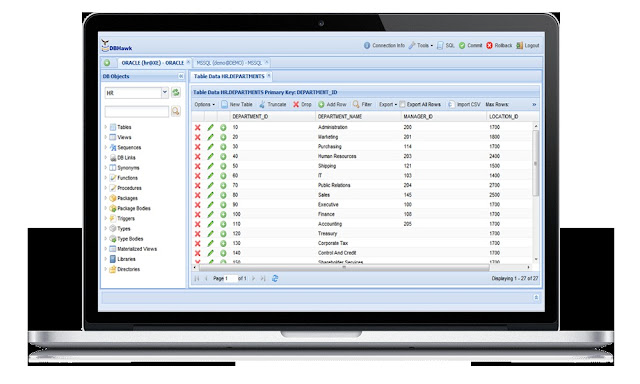
1.      Go for a web-based MySQL client tools online data browser – Look for one that supports comprehensive online database browsing functionalities. Use it to view, edit, insert new, update, or delete data. It should be useful when creating duplicate rows or updating values. The data browser should come with a blob data viewer and text data viewer, both of which you can use to explore data in one click.
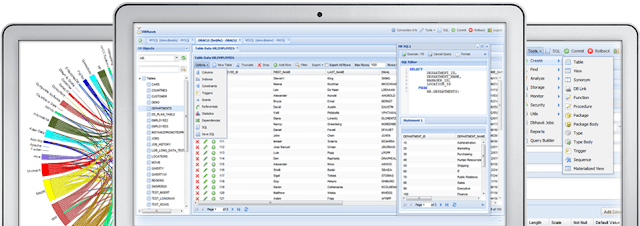


2.      Filter data and import or export data – A MySQL online data client comes with filters that can help you sort data under assigned conditions. This should allow you to find and explore only the data that you need. The MySQL client comes with export and import tools, too, which lets you use SQL query results data, export table data, and view data in HTML, PDF, Excel, or CSV formats. Likewise, you can save the exported data to the cloud or to your hard drive. CSV data can be imported into the database tables.


3.      Use the online table manager – Create, rename, count the total rows, drop, change, or rename a table and view column details with simple clicks on the intuitive online user interface. You can create a new view, drop a view, rename a view, or modify the view, too.


Benefits of Using Online Oracle Client Tools

If you use Oracle, having an online Oracle client tool will help database administrators and SQA developers create and manage databases through a web browser. Oracle client tools are easy to use and will not require you to have the actual Oracle platform on your computers. Development managers rely on these tools to provide faster access to data without a DBA. Here are some of the other benefits of using online Oracle client tools:


  • Use anywhere – Oracle SQL developers, SQL BI users, and DBAs can create or manage Oracle databases on a web browser. This way, development managers can audit SQL activities and have more power in managing their databases.

  • Online Oracle Client Tools is easy to use – With an intuitive user interface, Oracle SQL developers can rely on the visual SQL query builder to drag or drop tables, build Oracle database ad hoc and parameterized reports, create queries, online data dashboards, and schedule reports in a few simple clicks. SQL users can create D3-based charts, too, making the tools better than Oracle Application Express. However, like APEX, users are not required to create a PL SQL-based solution.

  • It comes with full browsing capabilities – Users can easily view database table data, count the total number rows in the table, or filter data. Users may view table column details, add new columns, and alter table columns using a column manager, too.


  • It has all the tools you will need to edit and export or import data – Oracle client tools let you create, update, insert, or delete data, or update blob and clob data. Use the export data feature to export the data into HTML, PDF, or CSV formats, or import CSV data into the tables.

  • Boost productivity – Some of the best Oracle client tools come with table indexes to allow faster and accurate table data search to view index details according to type, uniqueness, tablespace name, statistics, and columns.

A Beginner’s Guide to Data Analysis Using Online SQL Editor

Thinking of using an online SQL editor? It can be handy for running, editing, and building SQL queries without being restricted to using only one computer. With an online SQL editor, you can conduct data analysis anywhere on any device that has a reliable and secure web browser and internet access. Here is a guide that can help you make the most of an online SQL editor for data analysis:


  • Using the feature-rich and intuitive interface – It is completely based online, so database analysis should become efficient, simpler, and more powerful, even if you lack IT expertise. Use the SQL editor to execute SQL queries, like SELECT, DELETE, INSERT, and UPDATE statements. You can use it to cancel queries that have been running for a while, too.


  • You can multitask – An efficient online SQL editor can let you open multiple editor windows. By clicking the top right SQL button or right-clicking the table, you should be able to load table Select statements into the query editor. The same editor can let you upload saved queries or save SQL queries.

  • Executing multiple queries – Use the online SQL editor to execute multiple SQL queries in real-time. Run multiple SELECT statements and let the editor execute them and display the results in multiple tabs. If you are running several UPDATE or INSERT statements at a time, the online SQL editor will display the progress for every statement and continue running other statements, even if an error occurs with one or more statements.

  • Use the SQL explain plan – The query plan tells you how the query will be executed or how it was executed. That way, you have all the data that you need when you need to troubleshoot query performance issues. The online SQL editor will show the execution details for Oracle SQL, and the query execution plan for SQL server.

Monday, 17 October 2016

Advantages of Using Online MongoDB client

The document-oriented, open-source MongoDB is designed with both developer agility and scalability in mind. Classified as NoSQL, it steers away from relational database structure (table-based) and instead relies on an architecture of collections comprised of documents. If the goal of your company is to create applications that are impossible to build using other platforms, then online MongoDB client may be the best database for your business. You will be pleasantly surprised at its ability to improve your productivity and shorten the time it takes to complete certain tasks.
There are many advantages to using online MongoDB client. The key is to be aware of its capabilities and limitations so that you can decide if it is ultimately right for your goals and requirements.
Perhaps the biggest advantage of using online MongoDB client is horizontal scalability, via a technique referred to as ‘sharding.’ Data is distributed across several partitions to overcome hardware limitations and processing bottlenecks. Why store your data in rows and tables (such as in a relational database) when you can use MongoDB and store JSON (BSON) documents with dynamic schemas? Documents are part of ‘collections’ in MongoDB, and documents of varying schema can become part of the same collections. MongoDB provides ACID support at the document level.
Many experts also prefer to use online MongoDB client because MongoDB supports replica sets, thereby allowing high redundancy. There is an automatic failsafe mechanism so in the event that the primary server fails, a secondary server automatically takes over.MongoDB likewise offers connections and data encryption over SSL.
Using online MongoDB client certainly has many advantages and makes sense for many organizations. That said, MongoDB also has its limitations. It does not support some relational database features, including ‘joins.’ MongoDB also suffers from the inadequacies associated with NoSQL databases. But with its extensive community support and documentation, MongoDB is certainly a flexible and cost-effective NoSQL option.

Sunday, 16 October 2016

Increase Work Efficiency with Oracle Client Tools

Businesses that use Oracle need reliable Oracle client tools that allow SQA developers and database administrators manage and create databases through their web browser. These client tools are user-friendly and do not require an actual Oracle client to be installed on your system. Certain development managers can be used as client tools to give business users and developers faster access without using DBAs. Choose Oracle client tools that provide easy access to Oracle databases so that product managers can have complete control over them and so that user activities can be audited.
The best Oracle client tool enables developers to use a visual SQL query builder that allows them to simply drag and drop database tables as well as create database ad hoc reports. A good client tool also allows the creation of SQL queries, parameterized reports, schedule reports, and online data dashboards in one click. Users should also be able to create D3 based charts. More importantly, the client tool should offer high-end database security.  With a browser-enabled tool, your business may be able to boost its productivity while lowering downtime. The tool should allow data filtering, database data viewing, and other crucial functions. A good online Oracle editor client tool makes the creation, updating, and insertion of CLOB and BLOB databases much easier. It will let you export table data into several formats including HTML, PDF, and CSV. It should also be able to directly import CSV data into tables and then display column mappings.
In order to increase work efficiency with online Oracle client tools, you need to secure those tools from reliable database development experts to begin with. Be sure to verify if the tools come with added features like a database trigger manager, an index client tool, an Oracle constraints manager (web-based), a dependencies and referential viewer, as well as an object grants manager.

Manage Complex Database Easily with the Use of Online SQL Editor

An advanced online SQL editor lets you create, run, and manage SQL queries using an intuitive interface that you can access anytime and anywhere using a browser. An online SQL editor like DBHawk is a crucial tool if you want an extremely efficient way to manage databases. It can make database analysis faster and simpler and can be used even by those who have minimal IT knowledge and experience. Below is a list of the key features of an online SQL editor—features that can allow you to manage complex SQL databases more efficiently:
Execution and explain plans – These query plans are crucial when troubleshooting performance issues, as it helps determine how particular queries are executed while displaying all execution details.
SQL Editor – The DBHawk editor lets you run statements such as DELETE, SELECT, UPDATE, or INSERT. You can also terminate long-running queries as well as execute SQL queries. It is possible to open multiple editor windows.
Execution of multiple queries online – You can simultaneously run several SELECT statements. DBHawk will execute each statement and then show respective results (in multiple tabs). The progress of every statement is also shown. Should an error be encountered, DBHawk will continue running the rest of the statements—it won’t pause or wait for your command.
Formatter and history viewer – A robust online SQL editor lets you employ color syntax to format queries online. It’s easy to save and retrieve the SQL history of authorized users.
Finally, a good online SQL editor like DBHawk allows you to upload, save, or download SQL via your local file system. It is capable of running many SQL queries simultaneously. It’s easy to deploy and works with cloud databases and On-premises, and provides Central Security.

Overview: Online SQL Query Builder

An online SQL query builder is a versatile tool that enables you to build, run, and edit queries using an intuitive interface. It’s specifically developed for boosting productivity as it simplifies database analysis. If you are searching for an online SQL query builder, go for an advanced platform with the following characteristics:
  1. It should be completely online: A web-based online SQL query builder makes database analysis not only more efficient and flexible, but also extremely powerful. There is no need to install any application or software in your computers, laptops, or mobile devices. The database and all the tools can be accessed using a web browser from anywhere in the world.
  2. It should have an intuitive SQL editor: This allows even users without an IT background to execute queries, run UPDATE, SELECT, INSERT, and DELETE statements, deploy multiple editor windows, and cancel queries. Users can upload or save SQL queries if they need to.
  3. It should be a multitasker: The most advanced SQL query builders are able to execute multiple queries simultaneously. Run several SELECT statements at once and the query builder should have no problems executing them, and then displaying multiple-tab results alongside the progress of each statement. Should there be errors, the platform should continue to run other statements. This minimizes downtime.
  4. It should allow the building of carts and data grids: A good SQL query builder lets you build intuitive D3-based charts with query results, as well as data grid items that can be useful when creating dashboards.
  5. It should have execution plans: Make sure that it can provide you with a query plan that shows the execution of queries so that you know exactly what occurred when you need to troubleshoot performance issues. An explain plan should be displayed with the execution details.