Wednesday, 29 March 2017

5 Ways to Use DBHawk Oracle Client Tools

Oracle database management and development can be easier with DBHawk, a web-based online SQL reporting and client tool for Oracle and other platforms like MySQL, SQL Server, and SAP HANA. It is easy to use DBHawk Oracle client tools to manage or develop databases using your web browser. Hence, there is no need to install the Oracle client into any computer, and database development and management can be conducted from anywhere, and DBAs, developers, users, and managers can access their Oracle databases quickly. Here’s how to use DBHawk Oracle client tools:

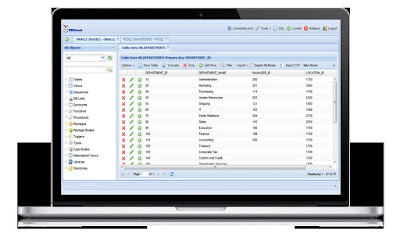
  • Use the data browser and column manager – DBHawk comes with an online Oracle data browser that lets you filter data, view database table data, and count the total rows in a table. Using the column manager, you can view column details, add new columns, and change table columns.

  • Use the data editor for a variety of functions – The online editor lets you update, insert, delete, and create data. Likewise, it lets you update CLOB and BLOB data. 
  • Import and export data using DBHawk – An online exporting data feature lets you export data from tables into file types like HTML and CSV, as well as PDF and INSERT formats. You may import any CSV data directly into the tables, too. DBHawk can parse the input CSV data columns and the display column mappings between the uploaded CSV file data columns and table columns. You can save the import as a job and make it run at regular intervals after a successful import. 

  • Search data using the index client tool – Table indexes enable a better way to search table data. With DBHawk, you can view details such as index type, uniqueness, columns, statistics, and tablespace name. You can add new by applying a new index screen, and preview the SQL before creating the index. 
  • Enforce rules efficiently on columns using the constraints manager – With DBHawk, you have a web-based constraints manager for Oracle to enforce rules on data columns on every table. Using that, you can view details on table constraints, particularly the type, status, name, and columns. 

Manage SQL without Installing Any Software With DBHawk Online SQL Editor

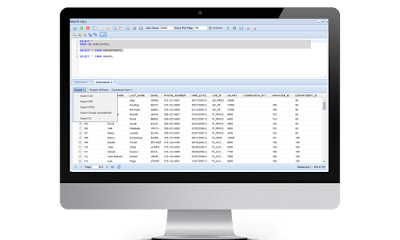
SQL database management used to be plausible only with a specific type of software on a single computer, but DBHawk’s online SQL Editor changed the game. With the DBHawk online SQL editor, it is now possible to build, run, and edit online SQL queries using a feature-rich and intuitive interface. The editor is designed to simplify database analysis to increase your productivity. DBHawk online SQL editor is currently the leading cutting-edge web-based platform, which you can access from any browser. Hence, you do not have to worry about installing software on every computer where you intend to manage your SQL database. Best of all, it is easy to learn and use, even if you lack IT expertise. Here is an overview of some of the remarkable features of the online SQL editor of DBHawk:

  • SQL editor – Execute SQL queries, run INSERT, SELECT, DELETE, or UPDATE statements, cancel long-running queries, open multiple editor windows or table select statements into the editor, or save or upload SQL queries to the editor. 
  • SQL Server execution or explain plans – The query plan provides insight on how the query was executed or how it will be executed. The information can be crucial for auditing or troubleshooting performance issues. DBHawk can display the Oracle SQL Explain plan explaining the execution details, and query execution plans will be displayed for the SQL server.

  • Multiple statement execution – DBHawk online SQL editor lets you execute several queries simultaneously. You can run multiple SELECT statements and leave it to the platform to execute them and display their respective results on multiple tabs. 
  • Formatter – Format SQL queries with color syntax highlights, not only to make them aesthetically pleasing, but to make them easier to scan or browse. 
  • History viewer – Using DBHawk, you can review the SQL history of users and previous SQL runs. It lets you sort the data by SQL query or run time.


5 Major Benefits of Using DBHawk Oracle SQL Query Builder

Database development management does not have to be challenging and confined to one or a few machines in the office when you use a web-based client like DBHawk. The web-based database management software and Oracle SQL client enables developers, users, and DBAs to develop and manage Oracle databases using their web browser without an Oracle client on every computer. The following are the other benefits of using the DBHawk Oracle SQL query builder:

  • Flexible and easy to customize – DBHawk can be customized to ensure that only the right features are useful to boost productivity, while making sure that procedures comply with regulations. This way, development managers can easily access business users and developers without DBAs, and managers can audit the SQL activities of users. DBHawk Oracle SQL query builder is a practical tool that can provide complete power to product managers by enabling quick and seamless access to Oracle databases. 
  • Save money and time – Being web-based, the Oracle SQL query builder by DBHawk eliminates the need to install software on every laptop or computer in the office. Access everything from your browser with the guarantee of security, and work remotely when required. Likewise, the platform helps you save time on maintenance, user training, and software license renewal, which can get expensive in the long run. 

  • Access to cloud-based databases – DBHawk Oracle SQL query builder lets you access both on premise and cloud-based databases from the browser. It is compatible with cloud platforms such as Amazon RDS and Redshift, and Heroku. 
  • A centralized platform for administrators – Database administrators will find the DBHawk Oracle SQL query builder to be highly secure and easy to use for auditing and monitoring user logins and logouts. 
  • Reliable reporting tools – Dashboards, data visualization, and reports can be created using web-based reporting platforms. The query builder makes it easier to schedule, build, or publish database reports, too.


Thursday, 19 January 2017

Overview: Online SQL Editor

Creating and building SQL queries for your databases should be easier with a web-based online SQL editor. Even with minimal knowledge of SQL and other query languages, the online SQL editor lets you manage your databases more conveniently without installing software on your computers. The web-based SQL client is easy to use and provides you with a simple tool to create and edit complex SQL queries for all the databases you are managing in your organization. The best online SQL editor is supported by all commonly used databases, including MySQL, Oracle, and PostgreSQL. This way, you get a versatile platform for creating any form of SQL query without writing a line of code. You can leave everything to the intuitive interface when you need to build queries or add conditions.


There are many ways that an online SQL editor can make database analysis more convenient and efficient. It lets you execute and explain plans, especially when you need to troubleshoot performance issues. Use the online SQL editor to see how certain queries were executed, and run statements like SELECT, DELETE, INSERT, and UPDATE. The same editor lets you execute SQL queries and stop long-running queries, too. The online SQL editor lets you open several editor windows at a time and execute multiple SELECT statements simultaneously. Leave it to the platform to execute the statements and display their results in unique tabs.


One of the best online SQL editors lets you access both on-premise and cloud-hosted databases. Likewise, the web-based editor can be deployed on-premise or on the cloud. Either way, it can still be accessed through your web browser. The online SQL editor comes with reporting tools to aid business data analysts in generating dashboards and reports. The comprehensive platform comes with a job scheduler, database report designer, and query builder, all of which can be used with simple point-and-click actions.

How to Use DBHawk Oracle Client Tools

Oracle SQL developers, SQL BI users, and DBAs can easily develop and manage Oracle databases using DBHawk. Its Oracle client tools are intuitive and easy to use. Best of all, DBHawk Oracle client tools are web-based, so there is no need to install software. This way, you can easily access your business users and developers without relying on any Oracle client or DBA. Managers are able to audit the SQL activities of users, too. Here are a few basic guidelines for using DBHawk Oracle client tools:


  • Using the data browser and editor – DBHawk oracle client tools supports the online database browsing capabilities of Oracle, so you can view database table data, count the total number of rows in a table, and filter data easily. The data editor lets you insert, create, delete, and update data, or update clob and blob data, too. Use the online Oracle column manager to view column details, add new columns, or alter table columns.


  • Importing and exporting data – Use the DBHawk online export data feature to transform exported table data into another format like HTML, INSERT, CSV, and PDF. Alternatively, you can directly import CSV data to the tables. DBHawk can parse input data columns and show column mappings between the uploaded CSV data columns and the table columns themselves. Upon successful import, you can save it as a job and set it to run at regular intervals.

  • Using the constraints manager – Constraints are rules enforced on the table’s data columns. With DBHawk, you can view details on table constraints, like the type, name, status, and columns. Click on the name to see detailed information like ‘last changed’, ‘reference owner’, ‘reference table’, ‘delete rule’, and ‘reference columns’. You can add a new foreign key, unique key, and primary key, too, and check, enable, disable, or drop constraints.

DBHawk MongoDB – Manage MongoDB Without Installing Any Software

MongoDB is an open-source cross-platform database program that is document-oriented. Instead of using SQL, it relies on documents that resemble JSON, with schemas. Managing MongoDB databases used to be restricted to machines that have certain types of software, but browser-based database management tools have made the job easier and more efficient without installing any programs. This way, MongoDB management can be cost-effective and simpler anytime and anywhere. DBHawk is one of the web-based database management solutions that works with MongoDB. It is an online GUI that is supported for Mac, Linux, and Windows platforms.

DBHawk has an intuitive MongoDB GUI that lets you query and browse full databases and documents from a browser. You can query documents using the advanced drag and drop online query builder of DBHawk. It is easy to use the data editor, online GridFS, JSON data viewer, and MongoDB Shell from your browser. The tool uses the pagination display that is native to MongoDB to let you view large collections. You can rename, add, or drop documents, apply a filter criteria, or apply paginations to see document details.


Using DBHawk, you can edit existing values, expand the full view, and browse documents. A few simple clicks can let you accomplish tasks like add new value, edit value, insert a new document, insert key-value, and remove field. Use the MongoDB Shell that comes with DBHawk to update and query data and conduct administrative operations. This time, it is a web-based interface that lets you execute commands to MongoDB. You can load as many shells as necessary for any number of operations, including multiple command statements.


DBHawk comes with an online GridFS utility, which is exclusive to MongoDB for retrieving and storing large files like audio, video, and images. Using this feature, you can view, search, and filter all or specific files in MongoDB. It simplifies the searching, renaming, deletion, uploading, editing, and downloading, of files, too. Likewise, DBHawk has a JSON data viewer that lets you recursively expand the document collection data and explore all data by right-clicking on an existing document.

Advantages Of Using DBHawk Oracle SQL Query Builder

DBHawk is a web-based SQL client that is versatile for a wide range of database applications. It simplifies access to various database platforms, including Oracle, with robust and reliable database auditing and security capabilities. This way, organizations can easily manage their databases while ensuring compliance with regulations. The DBHawk Oracle SQL query builder has flexible customization features to help boost the productivity of database managers regardless of their expertise in Oracle and IT. Here are more benefits of DBHawk’s Oracle SQL query builder and tools:

• Access anytime, anywhere – DBHawk is web-based. This means there is no need to install any software on multiple computers or laptops. Simply access the Oracle SQL query builder from your browser. This can be handy if you have to work remotely. This type of convenience helps users save time and money on user training, maintenance, and SQL client software purchase and renewal of licenses.

• Access to on-premise and cloud-based databases – DBHawk lets you access on-premise databases from your browser. Likewise, it lets you access databases that are hosted on clouds like Heroku, Amazon Redshift, and Amazon RDS. Developers can deploy it on-premise or on-cloud.


• Intuitive reporting tools – Web-based reporting tools let business data analysts create reports, data visualization, and dashboards. The Oracle SQL query builder lets them publish, build, or schedule database reports with only a few clicks.

• Everything in one place – A centralized database security platform and auditing capabilities lets administrators access everything in one convenient place. That way, they can easily monitor user logins, audit SQL activities, and logouts.

• Live data preview – As you build SQL queries, DBHawk showcases live data preview and lets you apply filter conditions on live data. Likewise, it lets you select columns and sort results. Even without SQL knowledge, you can use the DBHawk Oracle SQL query builder to export data from the data preview window into different formats, like HTML, PDF, and CSV.