Monday, 18 December 2017

Create an Amazing Database with Oracle Database Client Software

Oracle database client software is a free, lightweight and easy to use tool that enables users to create amazing databases and connect to the same locally or remotely for development or product deployment. This software is a package of components such as SQLNet and ASO that allow Windows or Mac computers to communicate with Oracle servers that contain databases in a distributed computing environment. However, using this tool for creating and managing a database can prove to be tough if one doesn’t possess requisite coding knowledge and technical expertise. This is where web based client software for Oracle database like DBHawk comes into play. With a sleek and intuitive interface, these software enable just about anyone to create an amazing database through your web browser. Let’s explore further:

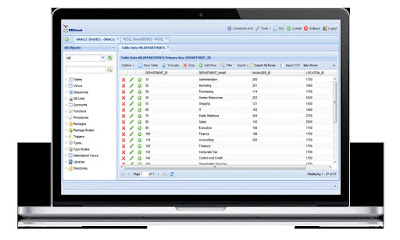
Database browser and Editor: DBHawk Oracle client database software allows users to view database tables and filter data quite easily. Once can also use it to insert, create, delete, and update data, or update clob and blob data, and use column manager to view, add and edit column details.

Data import and export: Web based oracle client database software like DBHawk allows users to export table data into multiple formats such as HTML, INSERT, CSV, and PDF and even import data into a database from CSV files. The system also allows you to save the imported data as a job or set it to run at regular intervals.

Database constraints and rules: If you wish to apply constraints and rules on your database to ensure its integrity and security, Web based oracle client database software allows you to use new foreign key, unique key and primary key as well as check, enable, disable, or drop constraints. You can also click on a name to access detailed information on parameters such as ‘last changed’, ‘reference owner’, ‘reference table’, ‘delete rule’, and ‘reference columns’.

Choose a web-based Oracle database client software to create an amazing database directly through your web browser without any hassle.

Thursday, 25 May 2017

PostgreSQL Query Builder: A Complete Solution to Query Database in a Visual Way

PostgreSQL is a one of the most commonly used database platforms for users who prefer a system that is flexible and cost-effective.  It’s probably because this open source object-relational database management system can run on various popular platforms such as Windows, Mac OS, Unix, and Linux. It also supports audio, text, images and video, as well as programming interfaces like Java, C and C++, Ruby, Python, and Perl. If you own a PostgreSQL and you want to make the most of it and build reports through it, then you should use a PostgreSQL query builder.

When looking for a query builder, you may want to choose a web-based version that is accessible from any browser. Also, if you want to make developing databases and conducting SQL analytics a lot easier, choose a builder that is intuitive and rich in features. A PostgreSQL query builder should make building SQL reports fairly easy. However, it is important to use the right one. An online query builder is flexible and versatile and will work on various operating systems with any updated browser. With its help, you can construct complex SQL queries or SQL select statements just by dragging and dropping any database table from the schema browser to the query builder.


The best PostgreSQL query builder would have a dedicated preview window that would allow you to explore data even as you build SQL queries. Building dashboards and visualizing data, reports, and charts will also be more convenient for you with the use of an advanced web-based query builder. You have the option to build and share reports securely and easily with other users directly from the platform.

You can expect a visual Postgresql query builder to allow you to open as many query tabs as you’d like and work on different builders all at the same time. You may also be shown live data preview as you build your queries, which would allow you to apply filter or various conditions on the data preview window.

Construct Complex Database Queries with Visual SQL Query Builder

If you need to construct complex database queries but have limited knowledge of SQL or other query languages, then use an SQL query builder. And if you don’t want to install any software on your machine, a web-based one is the best option for you. When looking for a query builder, go for one that is convenient, user-friendly, and visual. You can expect a good query builder to have an intuitive interface and enable you to create complex SQL queries without having to write any line of code at all.

A visual query builder lets you create your SQL select statements by simply dragging and dropping database tables from a schema browser to your query builder. It can automatically build join conditions based on foreign key and primary key between two tables. A visual query builder will give you the opportunity to multitask, allowing you to keep as many open query tabs as you wish. You can also work on different builders simultaneously. And wouldn’t it be nice if you can see live data preview as you build your queries?

There are visual SQL query builders that are also web-based. A web-based or online builder lets you apply various filter conditions on live data, sort results, select/un select columns—even without any SQL knowledge. You’ll also be able to export data from a data preview window into different formats, which may include CSV, PDF, and HTML. You can even export data and directly save on external storage such as amazon S3 or Google drive.

The best SQL query builders should be supported by all major databases such as Oracle, SQL Server, PostgreSQL, MySQL, and many more. Look for a query builder that has a free trial period so that you check whether it suits your preferences. 

Thursday, 20 April 2017

Protect Data Integrity with Database Security and Auditing

Your organization can produce a lot of data daily, and it makes good sense to protect it at all costs. Without proper database security and auditing, your organization could be at risk of data loss, which can be caused by operator error, hardware failure, or theft. High-end database auditing and security solutions provide a smarter way to monitor users and database operations. Reliable database security and auditing aims to control the security of information to protect the integrity, confidentiality, and availability of all databases. 

Keep in mind that database systems are constantly at risk for security issues and breaches. Without the right security and auditing solution, you could be unknowingly letting hackers and attackers see your most critical business data or information about your organization. Effective database security and auditing platforms should be able to monitor help you manage other security risks, such as malware, corrupt data, loss of data, and a buggy program. Malware can enter your database and enable attackers or third-party users to access the database to damage or delete your programs and personal or proprietary data, and cause important information to be disclosed or leaked to unauthorized individuals.


Some types of malware may deny access to the database, interrupt your work process, cause downtime in your productivity, and attack other databases. Database security and auditing should be able to protect data integrity by enabling you to monitor invalid data commands and the processes involved in system administration. Auditing your database is an important aspect of database security, as it lets you track SQL activities and database access securely. It may help find design flaws and programming bugs that could make your database vulnerable to data corruption, loss, and performance degradation.


Database security and auditing does not have to be challenging and time-consuming when you have a centralized tool that can let you do both. The best database security platforms come with an intuitive and web-based user interface to enable auditors and database managers to easily perform their duties from a browser. Consider a platform that can work with any database software like MySQL, SAP HANA, Oracle, SQL Server, PostgreSQL, Teradata, and Netezza.

How SQL Server Job Scheduler Enhances Your Schedule Management

A high-end web-based client for Microsoft SQL should come with a reliable SQL server job scheduler that will make it easier to manage schedules. With an intuitive user interface, the scheduler lets you arrange reports and configure them to send the results to you via email or save locally on a hard drive. The same platform lets you run SQL queries as a batch, and this can be helpful if you want to automate the workflow across different applications and platforms. It lets you see items that are scheduled to run and when they are running, and up-to-the-minute reports on ongoing jobs will be sent to you. Here are some of the other benefits of using an SQL server job scheduler:

Schedule reports and jobs with ease – Schedule an SQL report or query to run at regular intervals. You can configure it to save the report and results in formats like CSV, HTML, and PDF.


Schedule repetitive jobs - The SQL server job scheduler should make it easier to automate certain jobs and make them run frequently at assigned intervals. Enter repeat interval and control the minimum frequency of the repetition with the minJobRepeatInterval setting to lessen resource-intensive queries. The platform should be able to let you control the time frame of jobs. That way, jobs that are scheduled outside a given time span will not activate. This can be a critical feature if you want to restrict job scheduling, especially if the task will affect the performance of your database at peak hours.

Schedule import – The scheduler comes with a feature for importing a CSV job. Run a job to insert data from the CSV file to a database at regular intervals.

Job scheduler manager – Monitor any scheduled job or edit existing jobs. View information on the next run, first run, and last run time, or start, delete, or pause a job from the SQL server job scheduler.

Get notified – All users sharing the SQL Server job scheduler will receive notifications for any scheduled job.


Easiest Way to Build PostgreSQL Reports with A PostgreSQL Query Builder

PostgreSQL is an open source object-relational database management system that can run on different platforms like Windows, Mac OS, Unix, and Linux. It supports audio, text, video, and images, and programming interfaces like Java, C and C++, Ruby, Python, and Perl, making it one of the commonly used database platforms for users who prefer a flexible and cost-effective system. Using a PostgreSQL query builder will enable you to make the most of PostgreSQL and build reports with it. The best query builders are web-based and accessible from any browser. They come with an intuitive and feature-rich user interface to make it easier for you to develop databases and conduct SQL analytics.

Building SQL reports with a PostgreSQL query builder should be simple. As long as you use the right web-based platform, you should be able to perform the task with point-and-click simplicity. Like the original PostgreSQL database management system, the web-based query builder is versatile and capable of working on different operating systems with any up-to-date browser. Use it to construct complex SQL queries or to build SQL select statements by dragging and dropping any database table from the schema browser to the query builder.


The PostgreSQL query builder automatically builds join conditions according to the primary key and foreign key between two tables. You can explore the data from a dedicated preview window as you build SQL queries. And advanced web-based query builder comes with ad hoc reporting capabilities to make it easier to build dashboards, data visualization, reports, and charts. This way, it can be a suitable alternative to dedicated reporting services. Both business users and SQL developers can build and share reports securely and easily with other users directly from the platform.


Users may preview the reports before building them, and schedule reports to be saved on a user directory or sent via email after building them. PostgreSQL reports can be modified with parameters, and saved into formats like XLS, PDF, CSV, and HTML with the PostgreSQL query builder. If you are not sure about using this type of query builder for PostgreSQL, get in touch with a reputable provider of the platform for a live demo.

5 Reasons to Choose SQL Server Report Builder

An SQL server report builder can be one of the most essential tools for your organization’s database management needs. It is an ad hoc and web-based reporting tool that can work with your MySQL database and enable you to build reports, charts, data visualization, and dashboards, and you do not have to be an expert programmer to these tasks. Simply point and click at your desired actions and you should be able to use the SQL server report builder with ease. Apart from simplifying your job, here are five other reasons to choose a web-based report builder for your SQL server:

It can be a substitute to SQL Service Reporting Service – Some of the leading SQL server report builders eliminate the need to install multiple tools. Everything you will ever need to manage your database, build reports, and share them securely with other users is available in a single web-based platform. And because it can be accessed from any modern browser and operating system, you can easily do your job from anywhere, and you do not have to worry about installing anything on every machine in your organization.


It is secure – The SQL server report builder is designed to be a secure platform for building and sharing reports. It eliminates the need to be concerned with third-party access, attacks, and data loss or corruption.

Build ad hoc reports Users can create reports straight from the SQL server report builder and add parameters to them. Reports can be saved as PDF, XLS, HTML, and CSV formats, and they can be previewed before being built. Likewise, reports can be scheduled to be saved on a user directory or delivered by email after being built.

It can build data charts – The comprehensive report builder comes with tools that lets users create D3-based charts in different formats, like gauge, dendograms, heat maps, chord, pie, bubble, line, multi- or discrete bar, grouped/stacked area, box plots, and bullet.

Schedule reports – The SQL Server report builder can schedule a report to run at regular or repeated intervals.