Tuesday, 27 December 2016

Things to Keep in Mind While Using MongoDB Tools

Managing MongoDB should be easier with advanced tools that do not require you to install anything on your computers. MongoDB is one of the commonly used open source databases that uses a document-oriented data model. Hence, instead of having rows and tables that are typical of relational databases, MongoDB’s architecture consists of documents and collections. This is one of the most important things you should keep in mind when choosing or using MongoDB tools. Apart from that, be sure to consider the following factors while using MongoDB tools:

• Make sure it is web-based – A leading MongoDB tool can be accessed directly from your browser. Hence, there is no need to install software on every computer, and you can access your database anywhere at any time, even when you have to work remotely.

• Make sure it is a flexible platform – The best MongoDB tools can help you be productive by enabling you to perform many different tasks from a single platform. Look for tools that can let you browse and query documents and databases from a web browser. Web-based platforms should let you query documents using a drag and drop query builder. Consider a tool that comes with online JSON data viewer, Mongo DB Shell, MongoDB data editor, and the online GridFS.


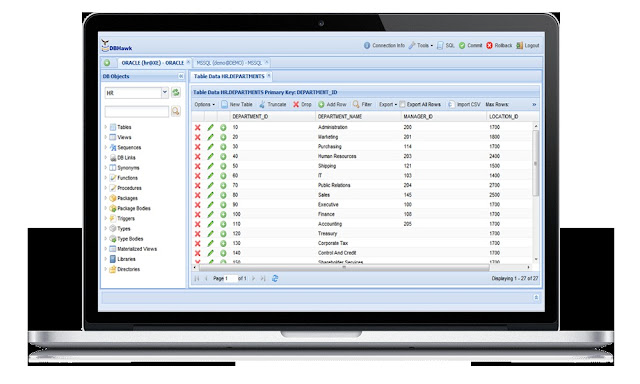
• Make the most of the intuitive GUI – You can view and browse full MongoDB collections and databases from the GUI. Pagination makes it easier to display and view large collections. You should be able to add a new document, drop or rename a document, apply paginations to view the details of a document, and apply filter criteria, too.

• Everything you need is in one place – Advanced MongoDB tools provide online access to on premise and cloud-hosted databases, and you can use the web SQL reporting tools that can generate data visualization, dashboards, and reports. Likewise, it provides centralized database auditing and security capabilities, so it is easier to monitor all logins and logouts, and audit activities from a single screen.

Overview: Oracle Client Tools

Oracle RDBMS is an object-relational database management system that lets you store and retrieve information, making it essential for proper information management in an organization or business. Oracle client tools can be handy when you want to access or manage your Oracle databases remotely. Some of the best tools are browser-based, so you can access and manage the database from anywhere. With web-based Oracle client and database management tools, SQL developers, SQL BI users, and DBAs can develop or manage databases from the web browser without installing an Oracle client on their computers.

Advanced web-based Oracle client tools enable development managers to provide easier and quicker access to business users and developers without relying on a DBA. Likewise, managers can keep track of every user’s SQL activities and perform audits on the spot. This way, Oracle client tools are able to provide complete power to managers. As for developers, they can use different tools for building SQL queries, Oracle database ad hoc reports, online data dashboards, and parameterized reports. SQL users can create D3-based charts, too. The same platform can make it easier to schedule reports with a few clicks.


Oracle client tools can be better alternatives to Oracle APEX (Application Express). Some tools work similarly to APEX, which does not require users to build PL SQL-based solutions. With complete browser-based access, users can save money and time on SQL client software and eliminate the need for new users to go through extensive user training. The platform offers online access to databases that are hosted either on clouds or on-premise through a web browser.


Business data analysts will find Oracle client tools useful when generating data visualization, dashboards, and reports. They can use the online SQL query builder, database report designer, online editor, and job scheduler to build, schedule, and publish database reports by themselves. This way, database analysis can be simpler and faster.

How to Use SAP HANA Tools

SAP HANA is one of those versatile database solutions can be deployed on-premise or in a cloud. It is considered a revolutionary in-memory data platform that is suitable for deploying and developing real-time applications and for performing real-time analytics. SAP HANA tools are alternatives to SAP HANA Cockpit, and in some cases, they are more advanced and capable of helping you make the most of your database, whether it is on-premise or hosted in a cloud. One of the best SAP HANA tools is web-based, which means you do not have to install anything on your computer and you can access your database directly from a browser. It comes with an advanced SQL editor, visual query builder, report builder, and job scheduler, all of which can be accessed from an intuitive web-based UI. Here’s how to use SAP HANA tools:

• Using the data browser – The best tools support the SAP HANA database browsing feature that lets you filter data, view database table data, and count the total number of rows in a certain table. Use it like how you would use the data browser in the actual platform.


• Data editor – Create, update, insert, or delete data just like you would on SAP HANA, but this time, you can do it on an online data editor.

• Table data filter – Some SAP HANA tools come with unique features that can make it easier to filter view data and table data in a few simple clicks. Use it to apply table data where order by conditions and condition to view data or filter data. You should be able to view table column details, too.

• Export and import data – Advanced SAP HANA tools let you export table data into different file formats like HTML, PDF, and CSV. Data can be exported as insert, too. Alternatively, you may import CSV data directly into the tables. The tool can parse input CSV data columns to display the column mappings between the uploaded CSV file data columns and the table columns.


Advantages of Using DBHawk Online SQL Editor

Using an SQL editor can be practical if you want a more flexible way to access and manage your database. DBHawk offers an advanced online SQL editor that lets you build, run, and edit SQL queries right on your browser. The feature-rich, intuitive interface is easy to use, regardless of skill set, so you can instantly start managing your databases efficiently and conveniently online. DBHawk is developed to improve database analysis by making it simpler, so you save time while boosting productivity. DBHawk online SQL editor is currently the leading online SQL editor for the following reasons:

• It provides pure browser-based access – DBHawk lets you access everything from your browser, so you do not have to install any SQL client on your computer. This way, you can save money and time, and eliminate the need to go through lengthy training to use the software. It simplifies maintenance across the enterprise, too.

• Access your database on-premise or on a cloud – DBHawk lets you access all databases hosted on-premise and clouds like Amazon Redshift, Heroku, and Amazon RDS. This can be handy for developers who need to deploy the platform on-premise or on the cloud from anywhere.


• Reporting tools – There are web SQL reporting tools that can let business data analysts create dashboards, reports, and custom data visualization. Using the query builder, database report designer, SQL editor, and job scheduler, you can create, schedule, or publish database reports in a few simple clicks.

• Secure – DBHawk lets you access your database from a single platform, making it more secure and convenient, especially when you need to perform audits. Administrators can keep tabs on everyone who logs in or logs out, and audit activities through a user-friendly administrative screen.

• Available for a free trial – Not sure if DBHawk is for you? Get in touch with a dedicated provider for a live demo and request a free trial. That way, you can use DBHawk online SQL editor and see for yourself what makes it good.

Thursday, 17 November 2016

4 reasons why you need to switch to dashboard reporting over power point

PowerPoint used to be the go-to program for presentations and reporting, but it has become  inefficient especially in the most demanding situations. The lack of interactivity, the software’s linear build, and the absence of options to share information have made PowerPoint impractical for the modern and more demanding workplace. In that case, you may need to consider switching to a more advanced method, such as dashboard reporting, which is more accessible and flexible. In fact, with dashboard reporting, you should be able to access your data through desktops, mobile devices, and laptops through a web browser and an internet connection. Here are reasons why you need to switch to dashboard reporting soon:
  • You have a lot of data to process and report quickly – It takes a lot of time to make PowerPoint presentations. With dashboard reporting, you can conduct your reports in real-time, while giving your audience the ability to interact with you. Dashboards let you re-plot datasets and transition between any graph or chart in real-time, too.
  • It is easier to share data – Dashboard reporting offers easier access to data, even if you need to do so with different departments remotely. You and your colleagues can easily collaborate, so you can make informed decisions, boost productivity, and come up with better ideas.


  • It gives you all the data that you need on the spot – It can take a long time to do SQL queries and export the results to a PowerPoint presentation. SQL query builders let you drag or drop information, filter data, export or import databases, and produce the results you want in just a few clicks.
  • You do not have to be a pro to use it – Dashboard reporting tools like web-based client tools have an intuitive user interface, which makes them easier to use, even if you are not an IT expert.

Explanatory MySQL Data Analysis Broken Down Into 3 Easy Steps

Structured query language is the commonly used standardized programming language to access a database, which is a structured collection of data. To access and effectively analyze data, you will need a database management system. For non-IT experts and non-technical users, MYSQL data analysis can become complex and confusing. The task is best left to the experts. MySQL data analysis should be that difficult if you know how to create tables and collate data and prepare it in a format that is easy to analyze. Moreover, as long as you use a reliable MySQL client, you should be able to make the entire process simpler and quicker to do. Here are three steps to help you perform data analysis using MySQL:

1.      Go for a web-based MySQL client tools online data browser – Look for one that supports comprehensive online database browsing functionalities. Use it to view, edit, insert new, update, or delete data. It should be useful when creating duplicate rows or updating values. The data browser should come with a blob data viewer and text data viewer, both of which you can use to explore data in one click.


2.      Filter data and import or export data – A MySQL online data client comes with filters that can help you sort data under assigned conditions. This should allow you to find and explore only the data that you need. The MySQL client comes with export and import tools, too, which lets you use SQL query results data, export table data, and view data in HTML, PDF, Excel, or CSV formats. Likewise, you can save the exported data to the cloud or to your hard drive. CSV data can be imported into the database tables.


3.      Use the online table manager – Create, rename, count the total rows, drop, change, or rename a table and view column details with simple clicks on the intuitive online user interface. You can create a new view, drop a view, rename a view, or modify the view, too.


Benefits of Using Online Oracle Client Tools

If you use Oracle, having an online Oracle client tool will help database administrators and SQA developers create and manage databases through a web browser. Oracle client tools are easy to use and will not require you to have the actual Oracle platform on your computers. Development managers rely on these tools to provide faster access to data without a DBA. Here are some of the other benefits of using online Oracle client tools:


  • Use anywhere – Oracle SQL developers, SQL BI users, and DBAs can create or manage Oracle databases on a web browser. This way, development managers can audit SQL activities and have more power in managing their databases.

  • Online Oracle Client Tools is easy to use – With an intuitive user interface, Oracle SQL developers can rely on the visual SQL query builder to drag or drop tables, build Oracle database ad hoc and parameterized reports, create queries, online data dashboards, and schedule reports in a few simple clicks. SQL users can create D3-based charts, too, making the tools better than Oracle Application Express. However, like APEX, users are not required to create a PL SQL-based solution.

  • It comes with full browsing capabilities – Users can easily view database table data, count the total number rows in the table, or filter data. Users may view table column details, add new columns, and alter table columns using a column manager, too.


  • It has all the tools you will need to edit and export or import data – Oracle client tools let you create, update, insert, or delete data, or update blob and clob data. Use the export data feature to export the data into HTML, PDF, or CSV formats, or import CSV data into the tables.

  • Boost productivity – Some of the best Oracle client tools come with table indexes to allow faster and accurate table data search to view index details according to type, uniqueness, tablespace name, statistics, and columns.